| Code | Description | Notes |
|---|
| 200 | OK | IIS 7.0, IIS 7.5, and IIS 8.0 successfully processed the request. |
| 304 | Not modified | The
client browser requests a document that is already in the cache, and
the document has not been modified since the document was cached. The
client browser uses the cached copy of the document instead of
downloading the document from the server. |
| 400 | Bad request | The
Http.sys file blocks IIS 7.0, IIS 7.5, and IIS 8.0 from processing the
request because of a problem in the request. Typically, this HTTP status
code means that the request contains characters or sequences that are
not valid or that the request contradicts the security settings in the
Http.sys file. |
| 401.1 | Logon failed | The
logon attempt is unsuccessful probably because of a user name or a
password that is not valid. For more information about how to resolve
this problem, click the following article number to view the article in
the Microsoft Knowledge Base:
942044 Error message when you try to run a web application that is hosted on IIS 7.0: "HTTP Error 401.1 - Not Found"
|
| 401.2 | Logon failed due to server configuration | This
HTTP status code indicates a problem in the authentication
configuration settings on the server. For more information about how to
resolve this problem, click the following article number to view the
article in the Microsoft Knowledge Base:
942043 Error message when you try to visit a webpage that is hosted on IIS 7.0: "HTTP Error 401.2 - Unauthorized"
|
| 401.3 | Unauthorized due to ACL on resource | This
HTTP status code indicates a problem in the NTFS file system
permissions. This problem may occur even if the permissions are correct
for the file that you are trying to access. For example, this problem
occurs if the IUSR account does not have access to the
C:\Winnt\System32\Inetsrv directory. For more information about how to
resolve this problem, click the following article number to view the
article in the Microsoft Knowledge Base:
942042
Error message when you try to browse a webpage that is hosted on a
server that is running IIS 7.0: "HTTP Error 401.3 - Unauthorized"
|
| 401.4 | Authorization failed by filter | An
ISAPI filter does not let the request be processed because of an
authorization problem. For more information about how to resolve this
problem, click the following article number to view the article in the
Microsoft Knowledge Base:
942079 Error message when you visit a website that is hosted on IIS 7.0: "HTTP Error 401.4 - Authorization failed by filter"
|
| 401.5 | Authorization failed by ISAPI/CGI application | An
ISAPI application or a Common Gateway Interface (CGI) application does
not let the request be processed because of an authorization problem.
For more information about how to resolve this problem, click the
following article number to view the article in the Microsoft Knowledge
Base:
942078
Error message when you visit a website that is hosted on a computer
that is running IIS 7.0: "HTTP Error 401.5 - Authorization failed by
ISAPI/CGI application"
|
| 403.1 | Execute access forbidden | The
appropriatelevel of the Execute permission is not granted. For more
information about how to resolve this problem, click the following
article number to view the article in the Microsoft Knowledge Base:
942065 Error message when you visit a website that is hosted on IIS 7.0: "HTTP Error 403.1 - Forbidden"
|
| 403.2 | Read access forbidden | The
appropriate level of the Read permission is not granted. Verify that
you have set up IIS 7.0, IIS 7.5, and IIS 8.0 to grant the Read
permission to the directory. Additionally, if you use a default
document, verify that the default document exists. For more information
about how to resolve this problem, click the following article number to
view the article in the Microsoft Knowledge Base:
942036 Error message when you visit a website that is hosted on IIS 7.0: "HTTP Error 403.2 - Forbidden"
|
| 403.3 | Write access forbidden | The
appropriate level of the Write permission is not granted. Verify that
the IIS 7.0, IIS 7.5, and IIS 8.0 permissions and the NTFS file system
permissions are set up to grant the Write permission to the
directory. For more information about how to resolve this problem, click
the following article number to view the article in the Microsoft
Knowledge Base:
942035 Error message when you visit a website that is hosted on IIS 7.0: "HTTP Error 403.3 - Forbidden"
|
| 403.4 | SSL required | The
request is made over a nonsecure channel, and the web application
requires a Secure Sockets Layer (SSL) connection. For more information
about how to resolve this problem, click the following article number to
view the article in the Microsoft Knowledge Base:
942070 Error message when you visit a website that is hosted on IIS 7.0: "HTTP Error 403.4 - Forbidden"
|
| 403.5 | SSL 128 required | The
server is configured to require a 128-bit SSL connection. But, the
request is not sent by using 128-bit encryption. For more information
about how to resolve this problem, click the following article number to
view the article in the Microsoft Knowledge Base:
942069 Error message when you try to browse a webpage that is hosted on IIS 7.0: "HTTP Error 403.5 - Forbidden"
|
| 403.6 | IP address rejected | The
server is configured to deny access to the current IP address. For more
information about how to resolve this problem, click the following
article number to view the article in the Microsoft Knowledge Base:
942068 Error message when you visit a website that is hosted on IIS 7.0: "HTTP Error 403.6 - IP Address Rejected"
|
| 403.7 | Client certificate required | The
server is configured to require a certificate for client
authentication. But, the client browser does not have an appropriate
client certificate installed. For more information, click the following
article number to view the article in the Microsoft Knowledge Base:
942067
Error message when you try to run a web application that is hosted on a
server that is running IIS 7.0: "HTTP Error 403.7 - Forbidden"
|
| 403.8 | Site access denied | The
server is configured to deny requests based on the Domain Name System
(DNS) name of the client computer. For more information about how to
resolve this problem, click the following article number to view the
article in the Microsoft Knowledge Base:
942066 Error message when you visit a website that is hosted on IIS 7.0: "HTTP Error 403.8 - Forbidden"
|
| 403.12 | Mapper denied access | The
page that you want to access requires a client certificate. But, the
user ID that is mapped to the client certificate is denied access to the
file. For more information, click the following article number to view
the article in the Microsoft Knowledge Base:
942064 Error message when you visit a website that is hosted on IIS 7.0: "HTTP Error 403.12 - Client Certificate Denied"
|
| 403.13 | Client certificate revoked | The
client browser tries to use a client certificate that was revoked by
the issuing certification authority. For more information, click the
following article number to view the article in the Microsoft Knowledge
Base:
942063 Error message when you visit a website that is hosted on IIS 7.0: "HTTP Error 403.13 - Forbidden"
|
| 403.14 | Directory listing denied | The
server is not configured to display a content directory listing, and a
default document is not set. For more information, click the following
article number to view the article in the Microsoft Knowledge Base:
942062 Error message when you visit a website that is hosted on IIS 7.0: "HTTP Error 403.14 - Forbidden"
|
| 403.16 | Client certificate is untrusted or invalid. | The
client browser tries to use a client certificate that is not trusted by
the server that is running IIS 7.0, IIS 7.5, or IIS 8.0 or that is not
valid. For more information, click the following article number to view
the article in the Microsoft Knowledge Base:
942061 Error message when you visit a website that is hosted on IIS 7.0: "HTTP Error 403.16 - Forbidden"
|
| 403.17 | Client certificate has expired or is not yet valid. | The
client browser tries to use a client certificate that is expired or
that is not yet valid. For more information, click the following article
number to view the article in the Microsoft Knowledge Base:
942038
Error message when you try to visit a webpage that is hosted on
Internet Information Services 7.0: "HTTP Error 403.17 (Forbidden) - The
client certificate has expired"
|
| 403.18 | Cannot execute requested URL in the current application pool. | A
custom error page is configured, and the custom error page resides in a
different application pool than the application pool of the requested
URL. For more information, click the following article number to view
the article in the Microsoft Knowledge Base:
942037 Error message when you visit a website that is hosted on IIS 7.0: "HTTP Error 403.18 - Forbidden"
|
| 403.19 | Cannot execute CGI applications for the client browser in this application pool. | The identity of the application pool does not have the Replace a process level token user right. For more information, click the following article number to view the article in the Microsoft Knowledge Base:
942048 Error message when you visit a website that is hosted on IIS 7.0: "HTTP Error 403.19 - Forbidden"
|
| 404.0 | Not found. | The
file that you are trying to access was moved or does not exist. For
more information, click the following article number to view the article
in the Microsoft Knowledge Base:
942041 Error message when you try to open a webpage that is hosted on IIS 7.0: "HTTP Error 404.0 - Not Found"
|
| 404.2 | ISAPI or CGI restriction. | The
requested ISAPI resource or the requested CGI resource is restricted on
the computer. For more information, click the following article number
to view the article in the Microsoft Knowledge Base:
942040
Error message when you try to visit a webpage that is hosted on a
computer that is running IIS 7.0: "HTTP Error 404.2 – Not Found"
|
| 404.3 | MIME type restriction. | The
current MIME mapping for the requested extension type is not valid or
is not configured. For more information, click the following article
number to view the article in the Microsoft Knowledge Base:
942032
Error message when users visit a website that is hosted on a server
that is running Internet Information Services 7.0: "HTTP Error 404.3 -
Not Found"
|
| 404.4 | No handler configured. | The
file name extension of the requested URL does not have a handler that
is configured to process the request on the Web server. For more
information, click the following article number to view the article in
the Microsoft Knowledge Base:
942052 Error message when you visit a website that is hosted on IIS 7.0: "HTTP Error 404.4 - Not Found"
|
| 404.5 | Denied by request filtering configuration. | The
requested URL contains a character sequence that is blocked by the
server. For more information, click the following article number to view
the article in the Microsoft Knowledge Base:
942053 Error message when you visit a website that is hosted on IIS 7.0: "HTTP Error 404.5 - URL Sequence Denied"
|
| 404.6 | Verb denied. | The
request is made by using an HTTP verb that is not configured or that is
not valid. For more information, click the following article number to
view the article in the Microsoft Knowledge Base:
942046 Error message when you visit a website that is hosted on IIS 7.0: "HTTP Error 404.6 - VERB_DENIED"
|
| 404.7 | File extension denied. | The
requested file name extension is not allowed. For more information,
click the following article number to view the article in the Microsoft
Knowledge Base:
942045 Error message when you try to browse a webpage that is hosted on IIS 7.0: "HTTP Error 404.7 - FILE_EXTENSION_DENIED"
|
| 404.8 | Hidden namespace. | The
requested URL is denied because the directory is hidden. For more
information, click the following article number to view the article in
the Microsoft Knowledge Base:
942047 Error message when you try to visit a webpage that is hosted on IIS 7.0: "HTTP Error 404.8 - HIDDEN_NAMESPACE"
|
| 404.9 | File attribute hidden. | The
requested file is hidden. For more information, click the following
article number to view the article in the Microsoft Knowledge Base:
942049 Error message when you try to visit a website that is hosted on IIS 7.0: "HTTP Error 404.9 - File Attribute Hidden"
|
| 404.10 | Request header too long. | The
request is denied because the request headers are too long. For more
information, click the following article number to view the article in
the Microsoft Knowledge Base:
942077
Error message when you visit a website that is hosted on a server that
is running Internet Information Services 7.0: "HTTP Error 404.10 -
REQUEST_HEADER_TOO_LONG"
|
| 404.11 | Request contains double escape sequence. | The
request contains a double escape sequence. For more information, click
the following article number to view the article in the Microsoft
Knowledge Base:
942076 Error message when you visit a website that is hosted on IIS 7.0: "HTTP Error 404.11 - URL_DOUBLE_ESCAPED"
|
| 404.12 | Request contains high-bit characters. | The
request contains high-bit characters, and the server is configured not
to allow high-bit characters. For more information, click the following
article number to view the article in the Microsoft Knowledge Base:
942075 Error message when you visit a website that is hosted on IIS 7.0: "HTTP Error 404.12 - URL_HAS_HIGH_BIT_CHARS"
|
| 404.13 | Content length too large. | The
request contains a Content-Length header. The value of the
Content-Length header is larger than the limit that is allowed for the
server. For more information, click the following article number to view
the article in the Microsoft Knowledge Base:
942074
Error message when you visit a website that is hosted on a server that
is running Internet Information Services 7.0: "HTTP Error 404.13 -
CONTENT_LENGTH_TOO_LARGE"
|
| 404.14 | Request URL too long. | The
requested URL exceeds the limit that is allowed for the server. For
more information, click the following article number to view the article
in the Microsoft Knowledge Base:
942073 Error message when you visit a website that is hosted on IIS 7.0: "HTTP Error 404.14 - URL_TOO_LONG"
|
| 404.15 | Query string too long. | The
request contains a query string that is longer than the limit that is
allowed for the server. For more information, click the following
article number to view the article in the Microsoft Knowledge Base:
942071 Error message when you visit a website that is hosted on a server that is running IIS 7.0: "HTTP Error 404.15 - Not Found"
|
| 404.17 | Dynamic content mapped to the static file handler. | For more information, click the following article number to view the article in the Microsoft Knowledge Base:
2019689 Error message when you visit a website that is hosted on IIS 7.0: "HTTP Error 404.17 - Not Found"
|
| 405.0 | Method not allowed. | The
request is made by using an HTTP method that is not valid. For more
information, click the following article number to view the article in
the Microsoft Knowledge Base:
942051
Error message when a user visits a website that is hosted on a server
that is running Internet Information Services 7.0: "HTTP Error 405.0 -
Method not allowed"
|
| 406.0 | Invalid MIME type. | The
request is made by using an Accept header that contains a MIME value
that is not valid. For more information, click the following article
number to view the article in the Microsoft Knowledge Base:
942050
Error message when you visit a website that is hosted on a server that
is running Internet Information Services 7.0: "HTTP Error 406 - Not
Acceptable"
|
| 412.0 | Precondition failed. | The
request is made by using an If-Match request header that contains a
value that is not valid. For more information, click the following
article number to view the article in the Microsoft Knowledge Base:
942056
Error message when you visit a website that is hosted on Internet
Information Services (IIS) 7.0: "HTTP Error 412 - Precondition failed"
|
| 500 | Internal server error. | This
HTTP status code may occur for many server-side reasons. For more
information, click the following article number to view the article in
the Microsoft Knowledge Base:
942031 Error message when you visit a website that is hosted on IIS 7.0: "HTTP Error 500.0 - Internal Server Error"
|
| 500.11 | Application is shutting down on the web server. | The
request is not processed because the destination application pool is
shutting down. Wait for the worker process to finish shutting down, and
then try the request again. If this problem persists, the web
application may be experiencing problems that prevent the web
application from shutting down correctly. |
| 500.12 | Application is busy restarting on the web server. | The
request is not processed because the destination application pool is
restarting. This HTTP status code should disappear when you refresh the
page. If this HTTP status code appears again after you refresh the page,
the problem may be caused by antivirus software that is scanning the
Global.asa file. If this problem persists, the web application may be
experiencing problems that prevent the web application from restarting
correctly. |
| 500.13 | Web server is too busy. | The
request is not processed because the server is too busy to accept any
new incoming requests. Typically, this HTTP status code means that the
number of incoming concurrent requests exceeds the number that the IIS
7.0, IIS 7.5, or IIS 8.0 web application can process. This problem may
occur because the performance configuration settings are set too low,
the hardware is insufficient, or a bottleneck occurs in the IIS 7.0, IIS
7.5, or IIS 8.0 web application. A common troubleshooting method is to
generate a memory dump file of the IIS 7.0, IIS 7.5, or IIS 8.0
processes when the error is occurring and then to debug the memory dump
file. |
| 500.15 | Direct requests for Global.asax are not allowed. | A
direct request for the Global.asa file or for the Global.asax file is
made. For more information, click the following article number to view
the article in the Microsoft Knowledge Base:
942030
Error message when you visit a website that is hosted on IIS 7.0: "HTTP
Error 500.15 - Direct request for global.asa are not allowed"
|
| 500.19 | Configuration data is invalid. | This
HTTP status code occurs because of a problem in the associated
Applicationhost.config file or in the associated Web.config file. For
more information, click the following article number to view the article
in the Microsoft Knowledge Base:
942055 Error message when you visit a website that is hosted on IIS 7.0: "HTTP Error 500.19 - Internal Server Error"
|
| 500.100 | Internal ASP error. | An
error occurs during the processing of an Active Server Pages (ASP)
page. To obtain more specific information about the error, disable
friendly HTTP error messages in the web browser. Additionally, the IIS
log may show an ASP error number that corresponds to the error that
occurs. For more information about ASP error messages and about the
meaning of ASP error messages, click the following article number to
view the article in the Microsoft Knowledge Base:
|
| 501.0 | Not implemented. | The
client browser sends an HTTP-Trace verb, and the server is not
configured to process the HTTP-Trace verb. For more information, click
the following article number to view the article in the Microsoft
Knowledge Base:
942058 Error message when you visit a website that is hosted on IIS 7.0: "HTTP Error 501.0 - Not Implemented"
|
| 502.1 | CGI application timeout. | A CGI application does not return a valid HTTP response in the
configured time limit. For more information, click the following article
number to view the article in the Microsoft Knowledge Base:
942059 Error message when you visit a website that is hosted on IIS 7.0: "HTTP Error 502.1 - Bad Gateway"
|
| 502.2 | Bad gateway: Premature Exit | A
CGI application returns an HTTP response that is not valid to the
server that is running IIS 7.0, IIS 7.5, or IIS 8.0. For more
information, click the following article number to view the article in
the Microsoft Knowledge Base:
942057 Error message when you visit a website that is hosted on IIS 7.0: "HTTP Error 502.2 - Bad Gateway"
|
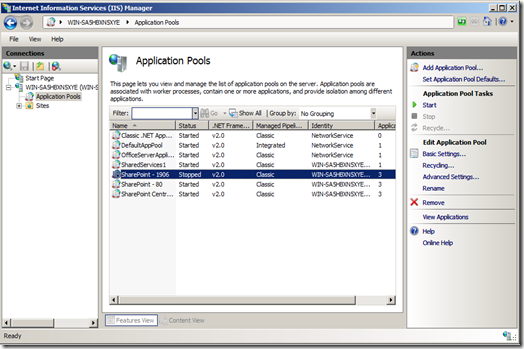
| 503.0 | Service unavailable. | The
request is sent to an application pool that is currently stopped or
that is currently disabled. To resolve this issue, make sure that the
destination application pool is started. The event log may give
information about why the application pool is stopped or disabled. |
| 503.2 | Concurrent request limit exceeded. | The appConcurrentRequestLimit property
is set to a value that is lower than the current number of concurrent
requests. IIS 7.0, IIS 7.5, and IIS 8.0 do not allow more concurrent
requests than the value of the appConcurrentRequestLimit property. |